
Nested / Feature / Fixed assets
Feature · Fixed assets

Fixed asset management
From purchase to disposal

Register assets, calculate depreciation automatically under your accounting policy, track the holder and location of every item, and post to the accounts without re-keying.

Register from a goods receipt Depreciation calculated daily 6 barcode standards
Everything fixed asset needs

Every assetEnd-to-end tracking

From purchase, use and transfer through to disposal, recorded in one system

Register straight from purchasing documents

Tick the “Asset” box on a goods/service receipt (GR), vendor invoice (AP) or cash allowance voucher (CV) and the system creates the asset code automatically, rolling freight and installation charges into the cost from day one.

Depreciation calculated every day

Updated 7 times during the day plus 1 overnight run, using the straight-line method based on the useful life you set, summarized into monthly accumulated totals. If you sell an asset mid-month, depreciation is calculated up to the sale date.

Set up the asset type once and use it for every item

Link the asset account, accumulated depreciation account, depreciation expense account and useful life to the asset type, so every item of that type is posted the same correct way.

Barcodes for real physical counts

Supports 6 standards: Code 128, EAN 8, EAN 13, QR Code, UPC-A and UPC-E. Print one label at a time or many at once, and choose the paper size and quantity you need.

Know who holds it, where it is and which cost center

The register keeps the holder, location, Cost Center, status and warranty period for each item. Change the holder instantly when an employee moves departments, and search and export to Excel.

Sell or write off, with gain or loss calculated for you

The asset sale document (AS) compares the sale price with book value automatically, with the VAT table, payment receipt table and accounting entries all on one document.

One connected flow

From registration to disposal
All in one system

Assets are registered at the moment of purchase, nothing slips through, and depreciation is posted automatically every day.

Buy it, then tick “Asset”

The system registers the asset from the goods receipt, vendor invoice or cash allowance voucher

Depreciation calculated daily

Calculated in 7 runs during the day and 1 overnight, and posted to the accounts automatically

Count with barcodes

Print barcode labels for assets and check the holder and location of every item

Sale / write-off

Issue an asset sale document (AS) and the system calculates the gain or loss and posts it

See it in action

Fixed asset registerWith a photo and holder for every item

See the asset photo, the purchase documents it came from, the holder and the depreciation status on one page.
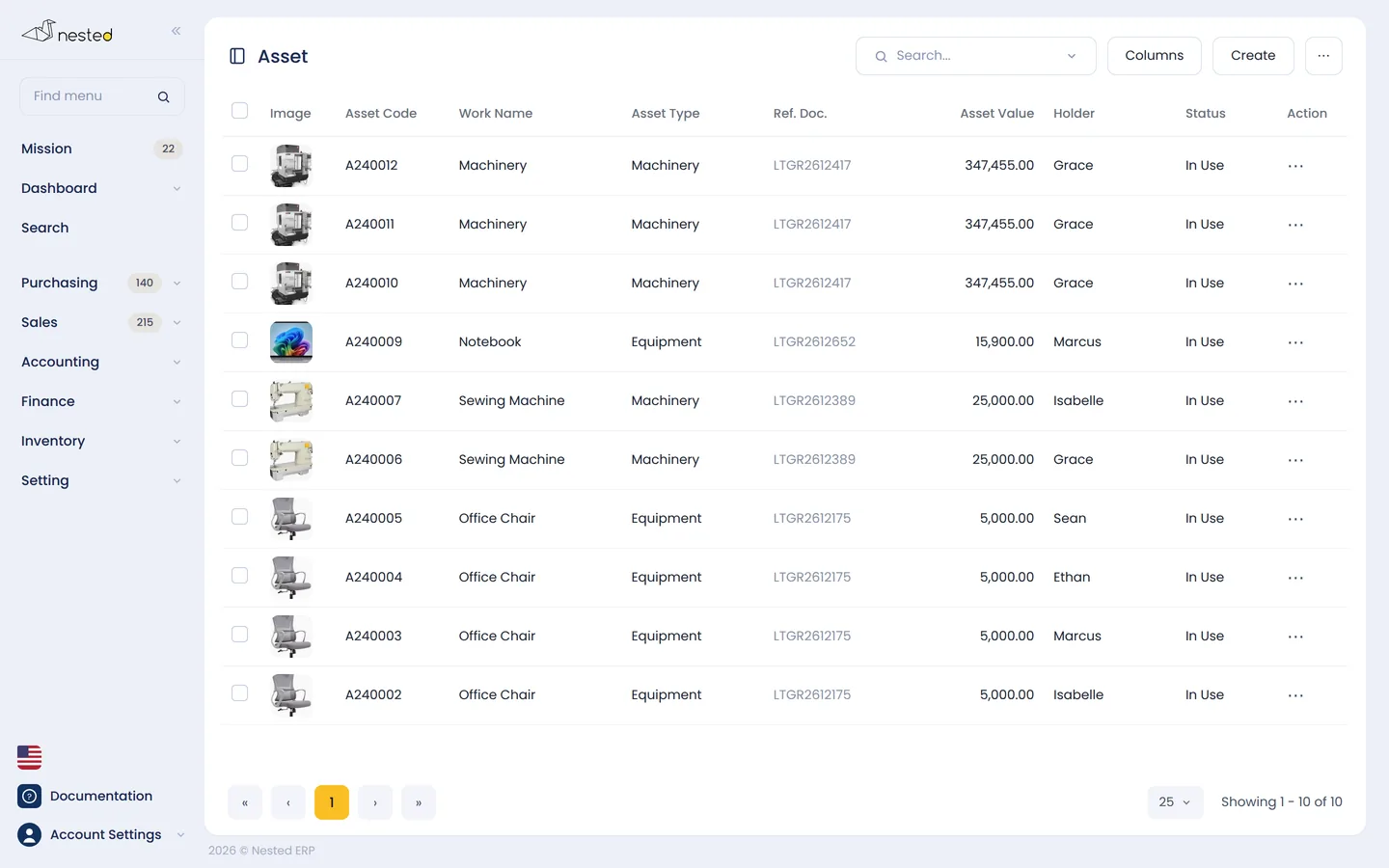
The Nested fixed asset register showing cost, accumulated depreciation and net book value
Common questions

Frequently asked questions aboutFixed asset features

Does it calculate depreciation automatically every month?
It is calculated every day, not only at month end — 7 runs during the day plus 1 overnight run. It uses the straight-line method based on the useful life and residual value you set, then summarizes accumulated depreciation monthly. If the accounting period is locked, the system will not calculate retroactively in that period.
Can I track where each asset is?
Yes. Every item has its own asset code, along with the holder, location, Cost Center, status and warranty period. When an employee changes departments or resigns, the “change holder” function updates it immediately. You can search by type, holder, Cost Center or status and export the results to Excel.
How much does an item have to cost to count as an asset?
What decides it is the intent behind the purchase, not the type of item. A pickup truck bought for resale is inventory, but the same truck bought to handle the company's own deliveries is a fixed asset. The value threshold commonly used is above 5,000 baht, which is only a guideline — each company can set its own threshold under the accounting policy it follows, and low-value items can still be entered in the register without depreciation.
Does it calculate gain or loss when an asset is disposed of?
It is calculated automatically. When you issue an asset sale document (AS), the system compares the sale price with the remaining book value and immediately posts the gain or loss on disposal. One thing to watch: keep documents for depreciating assets separate from non-depreciating assets, otherwise the gain or loss will not be calculated correctly.
Documentation

User guideFixed assetsIn detail

The real steps, screen by screen, along with the questions customers ask us most. Read it now, no sign-up required

See everything at Accounting guide

Free consultation

I'd like to try the fixed asset features
Get free advice from our team

Talk to our CPA team to see how well Nested's fixed asset system fits your business. Free of charge.

LINE QR code
LScan to add on LINE