
Nested / Feature / Tax
Feature · Tax

Calculate and file tax
Correct and on time
Every month

Calculate output and input tax from the actual documents, submit electronic tax invoices through INET, a certified service provider, and produce the reports for filing P.P.30 and P.N.D. — with filing status, document reversal and supplementary filing all in one place.

Automatic e-Tax submission 5 P.N.D. forms + Form 50 Tawi Input tax never loses its 6-month claim
Everything tax needs

Tax done rightFrom the moment the document is issued

Lower the risk of filing incorrectly and cut the time it takes to close monthly tax reporting.

Submit e-Tax automatically on the schedule you set

Connect by API to INET, a certified service provider, apply a time stamp and email the document to your customer automatically. Choose daily, weekly or monthly submission, for documents from the invoice (IV) through to the abbreviated tax invoice (ABB).

Every VAT rate calculated automatically

Supports 7%, the 0% rate for exports, and exempt items. If a tax amount is wrong it can only be corrected on the source document, so the tax reports always match the actual documents.

Input and output tax reports and P.P.30

The system creates the tax filing entries automatically at the start of each month. Print the sales tax report, purchase tax report, P.P.30 form and the accounting entries (GL) from a single page.

Withholding tax with Form 50 Tawi

Tick withholding tax on the document line, choose the income type and rate, and the system calculates it for you. Issue the withholding tax certificate (Form 50 Tawi) and print forms P.N.D. 1, 2, 3, 53 and 54 for filing straight from the system.

No input tax missed and none expired

Input tax is split into 3 tables — this month, next month, and over 6 months — and you can move the month in which you claim the credit, so no purchase tax invoice goes to waste by passing the 6-month limit.

Filed, reversible, and open to supplementary filing

Change the status to “filed” once you have submitted, reverse a document to correct it when the filing is not yet complete, and file a supplementary return in a later cycle if you find a missing entry.

One connected flow

From issuing the document to filing the tax
All in one system

Tax is captured the moment the document is issued, so there is no chasing it down at month end.

Issue documents with the tax rate applied

Set VAT and withholding tax right at the document line.

Submit e-Tax to your customer and the Revenue Department

Submit manually or have the system submit on a schedule you set

The system builds the tax reports at the start of each month

Output and input tax for the month are totaled for you, ready to review before filing.

File P.P.30 / P.N.D. and close out the tax

Print the return, change the status to filed, and post the entries that close out input and output tax.

See it in action

Withholding tax reportReady to file P.N.D.

Choose the form you need from P.N.D. 1, 2, 3, 53 and 54, review the entries by counterparty, then change the status to filed.
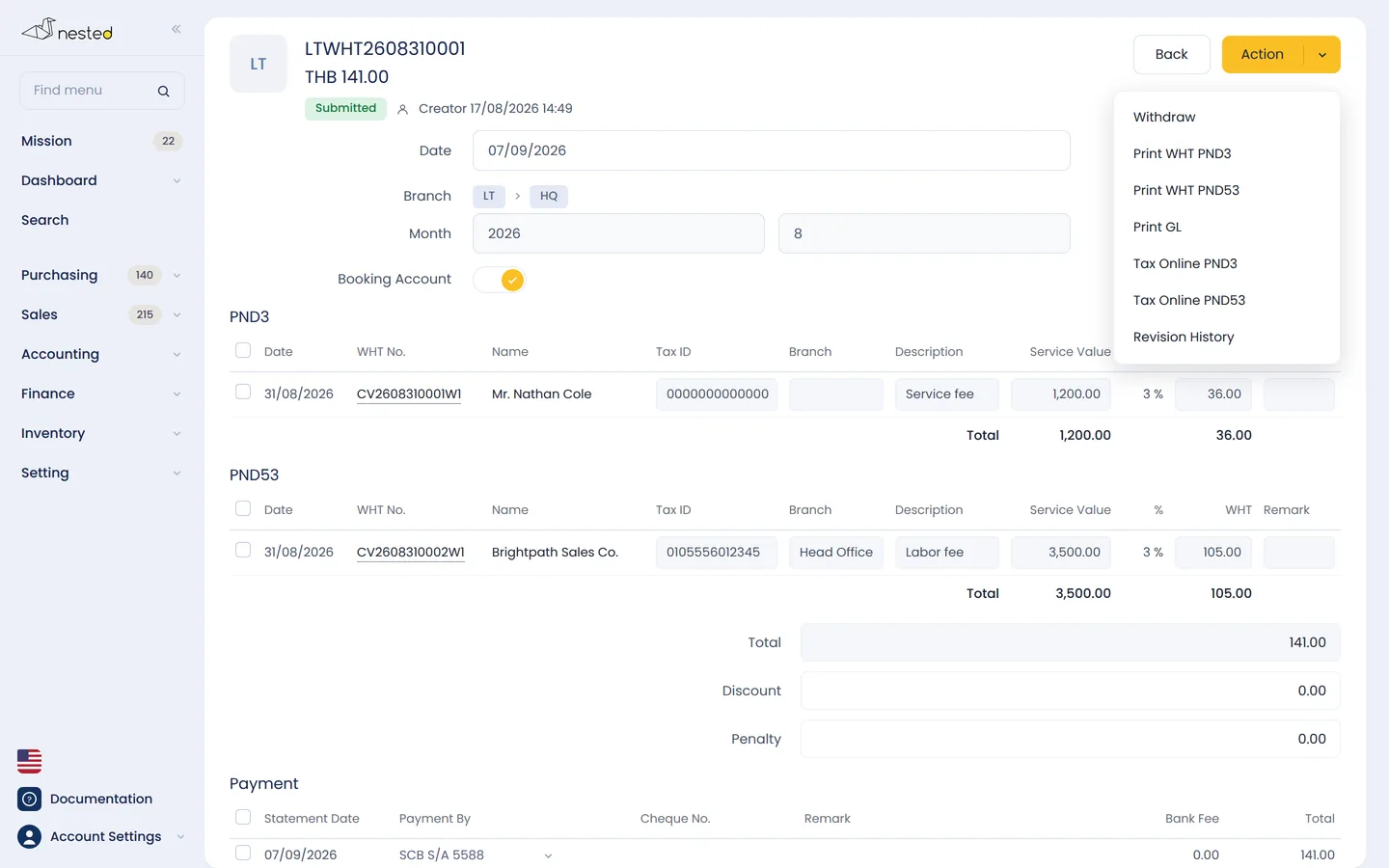
The Nested withholding tax screen showing the details used to issue a Form 50 Tawi certificate
Common questions

Frequently asked questions aboutTax features

Can the system issue electronic tax invoices (e-Tax Invoice)?
You can issue them directly from the system, but you must register with the Revenue Department first. Then enter the API details you receive from INET in the company settings menu and set the e-Tax start date to match your approval date. Only documents dated on or after that date can be submitted.
Do I have to prepare the input and output tax reports myself?
You don't have to. The system gathers every sales and purchase tax invoice into a report automatically at the start of each month, with the data needed to file P.P.30. If a tax amount is wrong, you have to correct it on the source document, because the tax table is a report drawn from the actual documents.
Does it calculate withholding tax automatically?
Tick the withholding tax box on the document line, then choose the income type and the statutory rate. The system calculates the amount withheld, issues the withholding tax certificate (Form 50 Tawi) for your counterparty, and consolidates every entry into a report for the monthly P.N.D. filing, supporting 5 forms: P.N.D. 1, 2, 3, 53 and 54.
Can a document already submitted by e-Tax be cancelled or corrected?
A document already submitted to the Revenue Department cannot be cancelled outright. If the amount is wrong, issue a credit note (CN) to clear the original document, then issue a new set. If only the customer details are wrong — the name or address, for example — and the tax base is unchanged, use REISSUE: the system issues a new tax invoice with a note referencing the original.
Documentation

User guideTaxIn detail

The real steps, screen by screen, along with the questions customers ask us most. Read it now, no sign-up required

See everything at Accounting guide · Sales guide · Setup guide

Free consultation

I'd like to try the tax features
Get free advice from our team

Talk to our CPA team to see how well Nested's tax system fits your business. Free of charge.

LINE QR code
LScan to add on LINE