
Create a quotation, a sales order (SO) and a tax invoice one after another without rekeying. Stock is reserved and entries are posted automatically, and you always know which bills are due for billing and which invoices are past due.
From quotation through to payment collection, the system covers every step of the sales process, in the document formats Thai businesses actually use.
Present pricing for goods or services for the customer to consider before they decide to buy.
An internal document telling each department, such as the warehouse and accounting, to prepare the next step after the customer confirms the order.
Bill and collect from the customer for the goods sold.
Bill and collect from the customer for the services already delivered (this document is an invoice, not a tax invoice).
Record the difference to be charged additionally, for example when the price was calculated lower than agreed or more goods were delivered than the quantity agreed.
Record the difference to be credited back to the customer, for example when the price was calculated higher than agreed or fewer goods were delivered than the quantity agreed.
Consolidate a customer's total outstanding balance for a defined period so it can be billed and paid in one go.
Proof of a deposit received before goods or services are delivered, posted automatically to the deposits received account.
Proof of payment for VAT-registered retail businesses, issued to individual consumers on the spot at the counter.
Proof of payment received from a customer for goods
Proof of payment received from a customer for services
Proof of cash received for a cash sale
From quoting the customer to money in the bank, with no screen switching and no rekeying.
Issue an SO and the system immediately reserves the goods from the selected warehouse, so the same item is never sold twice, then deducts actual stock on delivery.
Specify which installment is the deposit and which is collected on delivery, issue an advance income document (AI), and the system spreads and deducts the deposit according to the quantity delivered.
Tick Ret. and the system calculates the retention amount from the pre-VAT total using that customer's percentage, with a clearly stated release date and a retention table showing the PO number and Cost Center.
Set a billing cycle per customer, for example the 10th and the 25th of each month. The system rolls forward to the next cycle automatically once the date passes, and you can filter for invoices that have not been billed yet.
Issue the tax invoice together with the delivery note, submit e-Tax automatically at the scheduled time, email it to the customer and keep a copy in the cloud.
Let the system create a Cost Center from the sales order number automatically, then match it to the purchasing documents to see the cost and profit of each job.
Every step is linked automatically. Confirm once and the system handles the rest.
Quote the customer, with terms and discounts specified
The customer confirms and the system reserves stock automatically
Issue the delivery note and the tax invoice together, with stock deducted and entries posted automatically.
Reconcile payments, close bills and post entries automatically
Every time a sales order is issued, the system immediately reserves stock from the selected warehouse, so you can be confident you are only selling what you actually have.
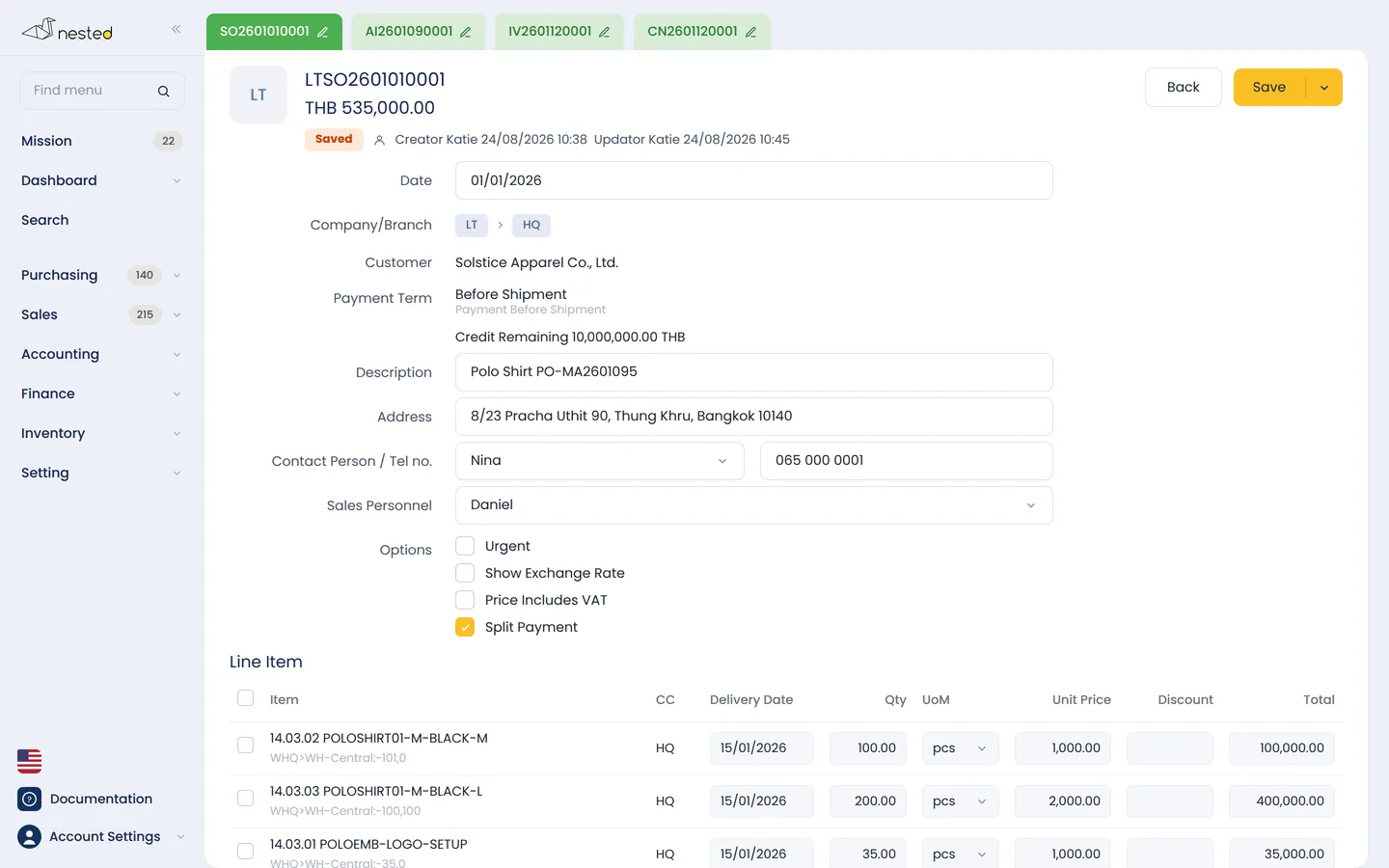
Every time a sales order (SO) is issued, the system automatically reserves stock from the selected warehouse, preventing you from selling more than each branch actually has.
Talk to our CPA team to see how well Nested's sales system fits your business. Free of charge.
 Scan to add on LINE