
Nested / Feature / Finance
Feature · Finance

See cash flow across the whole organization
Looking ahead, every day

Bank accounts, the cheque register and petty cash allowances in one place. Every entry shows the date the money actually clears, so you can plan liquidity ahead instead of finding out at month end.

A complete register of cheques received and paid Cash allowances auditable down to the baht Exchange rates from the BOT
Everything finance needs

Cash managementWith a forward view

Know in advance when cash will run short and whether you have enough to pay suppliers on time.

Know the day the money actually leaves

Every receipt and payment keeps the document date, cheque date and statement date separate, so you plan liquidity from the day the money actually clears, not the day the document was issued.

Control the whole cheque book

Set the starting and ending cheque numbers for each bank account and the system issues cheque numbers automatically, with registers of cheques paid and received pulled from every document that uses a cheque.

Separate cheques on hand from cheques already cleared

See at a glance which cheques have been paid or received but have not yet cleared, so the cash you can actually use matches reality, not the book balance.

Cash allowances auditable down to the baht

Set the allowance, name who may use it and when it falls due, spend against it with a cash allowance voucher (CV) that goes through approval first, then top the allowance up or close it at the end of the cycle.

Bank reconciliation

Match the documents in the system against the bank statement by date, record bank charges from the same screen, then lock the entries you have checked so they cannot be changed afterward.

Exchange rates from the Bank of Thailand

Enable multiple currencies on purchase and sales documents. The system pulls the previous business day's rate for you and adjusts the tax base to match FOB for export work.

One connected flow

From bank accounts to reconciliation
Auditable at every step

Every inflow and outflow has a supporting document and is posted automatically, and every one can be traced back.

Set up bank accounts & cheque books

Link each account to the chart of accounts and set the range of cheque numbers it can use

Receipts and payments from the source document

Payment vouchers, receipts, interest, bank charges and transfers between accounts

Draw cash through a CV with approval

Approval before spending, a reason required for any rejection, and a lock by accounting once checked.

Reconcile against the statement

Match balances by statement date, then lock the period once the review is done

See it in action

Balances across every bank accountAll in one place

See the balance of each account, with receipts and payments sorted by statement date
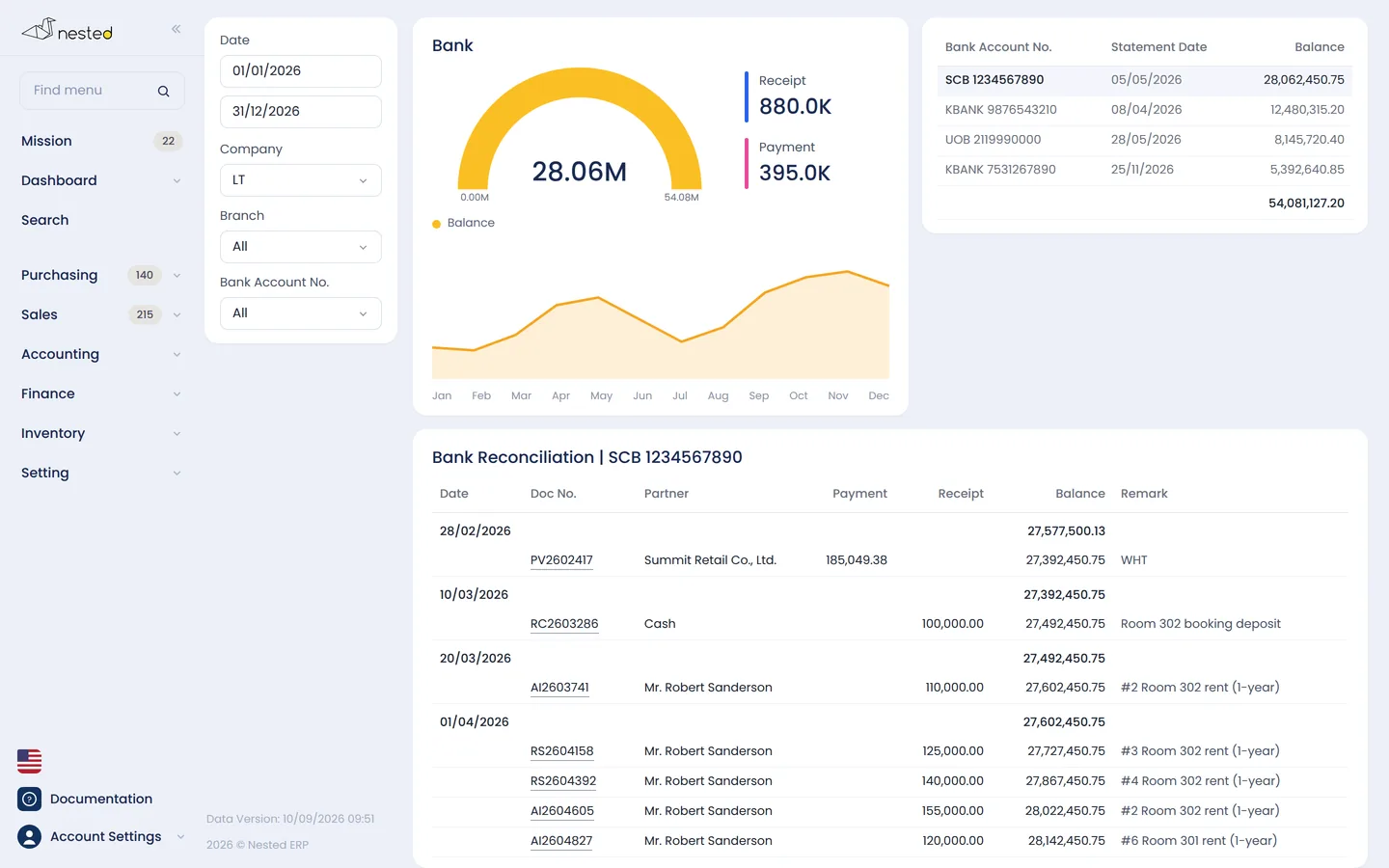
The Nested finance screen showing the balance of each bank account and its transactions
Common questions

Frequently asked questions aboutFinance features

How do I see money in and money out ahead of time?
Every receipt and payment has a “Statement date” — the day the money actually enters or leaves the account — separate from the document date. Cheques paid out or received but not yet due sit in “cheques on hand” status, so you can see which amounts will clear and when, before it actually happens.
How do I manage petty cash and field advances?
Use the Cash Allowance menu to set an allowance for each person or each unit, naming who may use it and when it falls due. Spending is recorded as a cash allowance voucher (CV), which has to go through approval first, and the system deducts the remaining balance for you. When the allowance runs low you can top it up, or close it when the work is done.
Can one cheque number be used on several documents?
Yes. Enter the cheque amount on the first document as the total of every document that uses that cheque, and the system will combine the amounts and draw down the cheque's remaining balance correctly. Cheque details can only be edited from the source document, and when the source document is cancelled the cheque number is cancelled along with it.
Can I record employee payroll payments in the system?
Yes. Create a counterparty named “Employees (payroll)”, then record the payroll expense as a vendor invoice (AP), enabling withholding tax on the lines that need it and entering social security contributions as a negative amount. Then pull the AP into a payment voucher (PV) and select the bank account you pay salaries from.
Documentation

User guideFinanceIn detail

The real steps, screen by screen, along with the questions customers ask us most. Read it now, no sign-up required

See everything at Finance guide

Free consultation

I'd like to try the finance features
Get free advice from our team

Talk to our CPA team to see how well Nested's finance system fits your business. Free of charge.

LINE QR code
LScan to add on LINE